
Media Setup
Setting Up Automated Media Optimization
Last Updated: July 15, 2026
Core Web Vitals Benefit
Pairing Runware's lightning-fast AI image generation with local smart WebP compression guarantees beautiful, context-aware images with tiny file sizes (average ~147KB WebP) to maximize your page speed and Largest Contentful Paint (LCP) scores.
Step 1: Generating Fast AI Images with Runware
- Go to runware.ai and create an account.
- Navigate to your account developer dashboard and locate the API settings.
- Generate a new API Key.
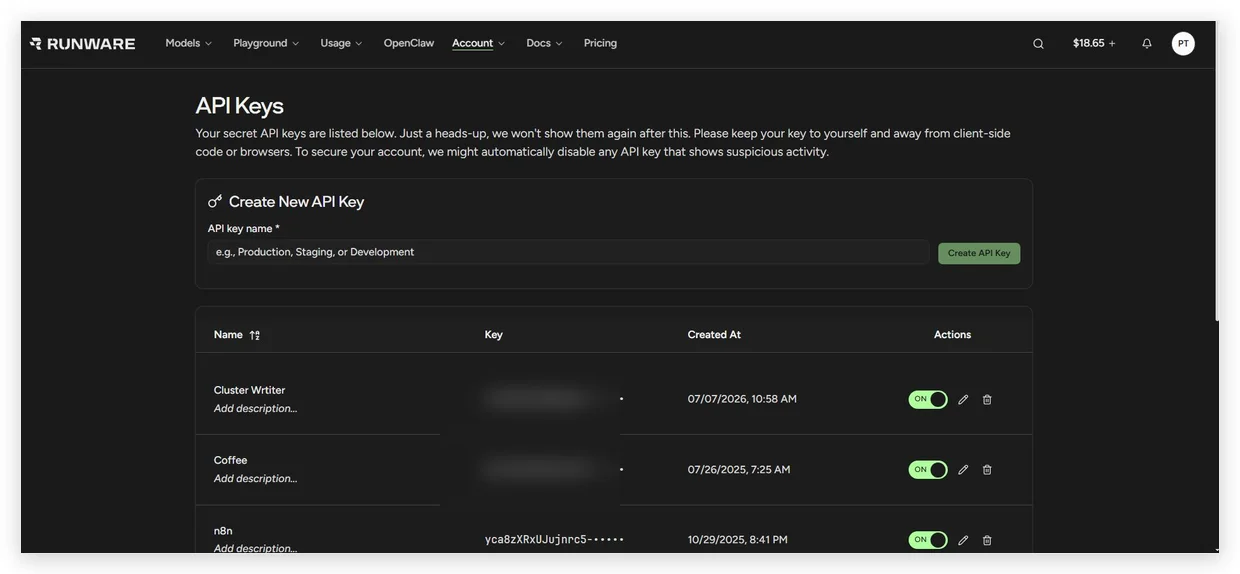
Figure 3.1: Copying the API key in the Runware AI Console.
- Copy the key and paste it into the Runware API Key field in your ClusterWriter Settings dashboard.
Step 2: Automated Out-of-the-Box WebP Image Compression (Zero-Config)
Image compression is 100% automated out-of-the-box via ClusterWriter's built-in local Python Pillow WebP engine (Quality=82, Method=6).
- Zero Third-Party API Keys: You do NOT need to register or manage any TinyPNG API credentials.
- Ultra-Fast Execution: Microsecond in-memory processing directly on the server container before WordPress publishing.
- Maximized PageSpeed: Reduces raw image file sizes by over 80% (~120KB per WebP image) without visual quality loss.